Issue Radar and Heatmap
Two visual dashboards that turn defect data into patterns. These are arguably the most important analytical tools in the section — defects scattered in a list look random; defects on a heatmap reveal themselves as systematic.
QC Issue Radar
A clustering view of defects across the recent inspection history. Each cluster is a recurring pattern — same defect category, same operation, same unit, same shift — and the dashboard surfaces the largest clusters first.
Use it to:
- Find the top three problems to fix this week. If the radar shows one defect category dominating, that's where focus goes.
- Spot cross-unit patterns. A defect appearing across three different units suggests a material or spec issue, not a unit issue.
- Confirm whether yesterday's intervention worked. A defect cluster shrinking over a week means the root cause is being addressed.
QC Heatmap Report
A two-dimensional visualization of where defects are concentrated. The most common configurations:
- Operation × Defect Category — which operation produces which kind of defect. Reads at a glance: "Stitching is producing most of our skipped-stitch defects" (expected) or "Wash is producing dimensional defects" (interesting and worth investigating).
- Unit × Defect Category — which units are producing which kinds of defects. Often shows a unit specializing in a particular failure mode.
- Time × Operation — when defects spike. Mondays at Stitching? Afternoon shifts? End-of-month rushes? The time axis surfaces patterns nothing else does.
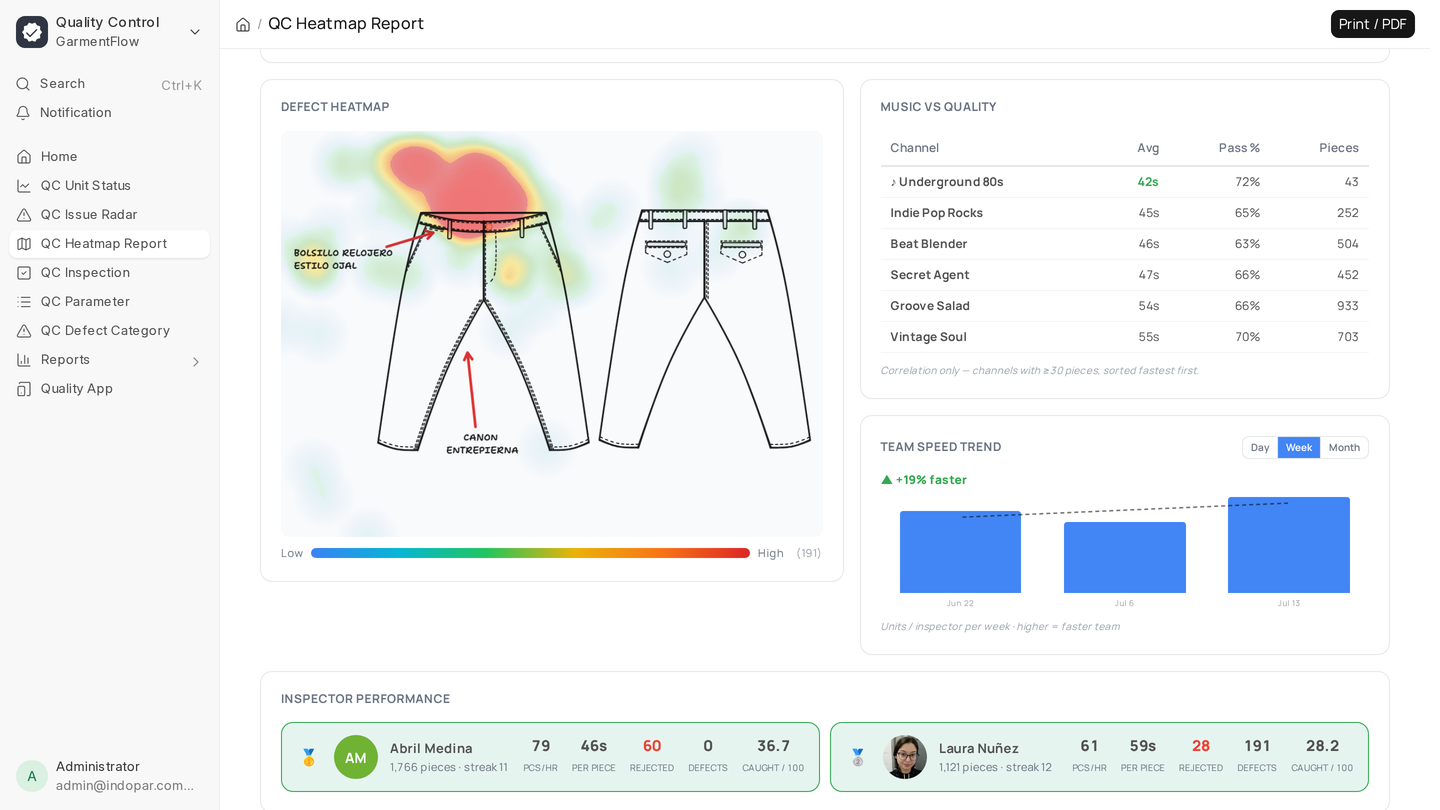
- Garment Location × Defect Category — using the X/Y coordinates captured on Defect rows, the heatmap can show where on the garment defects concentrate. The chest seam, the right cuff, the inside hem. Visual maps of recurring problems on the garment itself.
How to read the stats
The heatmap isn't just colors. Each cell carries:
- Count — how many defects in that cell, in the configured time window.
- Rate — defects per 100 inspected units. The right denominator for comparison.
- Trend arrow — up, down, or flat compared to the previous period of the same length.
- Significance flag — whether the cell's count is statistically meaningful or could be random noise. A single defect in a small sample isn't a pattern; the dashboard flags low-significance cells so they don't draw the eye unfairly.
The combination is what makes the heatmap actionable. A red cell that's high-count, high-rate, trending up, and statistically significant is a real signal — and where you focus.
Patterns to look for
- Hot rows. A single operation lighting up across multiple defect categories means the operation itself is in trouble — a machine, a setup, an operator.
- Hot columns. A single defect category lighting up across multiple operations means the defect's cause isn't where you're seeing it — could be the material, could be the spec.
- Diagonal clusters on time × operation. Often points at shift handoffs — defects that show up at the same time each day track to who's on duty.
- Body-location clusters. If 60% of fabric defects on a tee are mapped to the chest, the cut is doing it (or the fabric has a recurring flaw in the same place across rolls).
Filtering matters
The heatmap rewards filtering. Run it for:
- One brand at a time — different brands have different tolerances.
- One Tech Pack at a time — defects on Style A may have nothing to do with Style B.
- One Item Group at a time — Tops and Bottoms tell different stories.
- One time window at a time — last week vs last quarter shows whether the problem is current or historical.
A factory that's running the heatmap weekly with consistent filters builds up an intuition for what "normal" looks like at their plant. From there, anomalies stand out instantly.
When to read these together
Issue Radar tells you what's recurring; Heatmap tells you how it distributes. The combination — a top cluster from Issue Radar drilled down on the Heatmap to find its operation/time signature — is the standard root-cause workflow.
What to do next
That closes dashboards. For tabular reports useful for monthly reviews, brand audits, and shareable lists, see Quality reports.