Points of Measurement and Grading
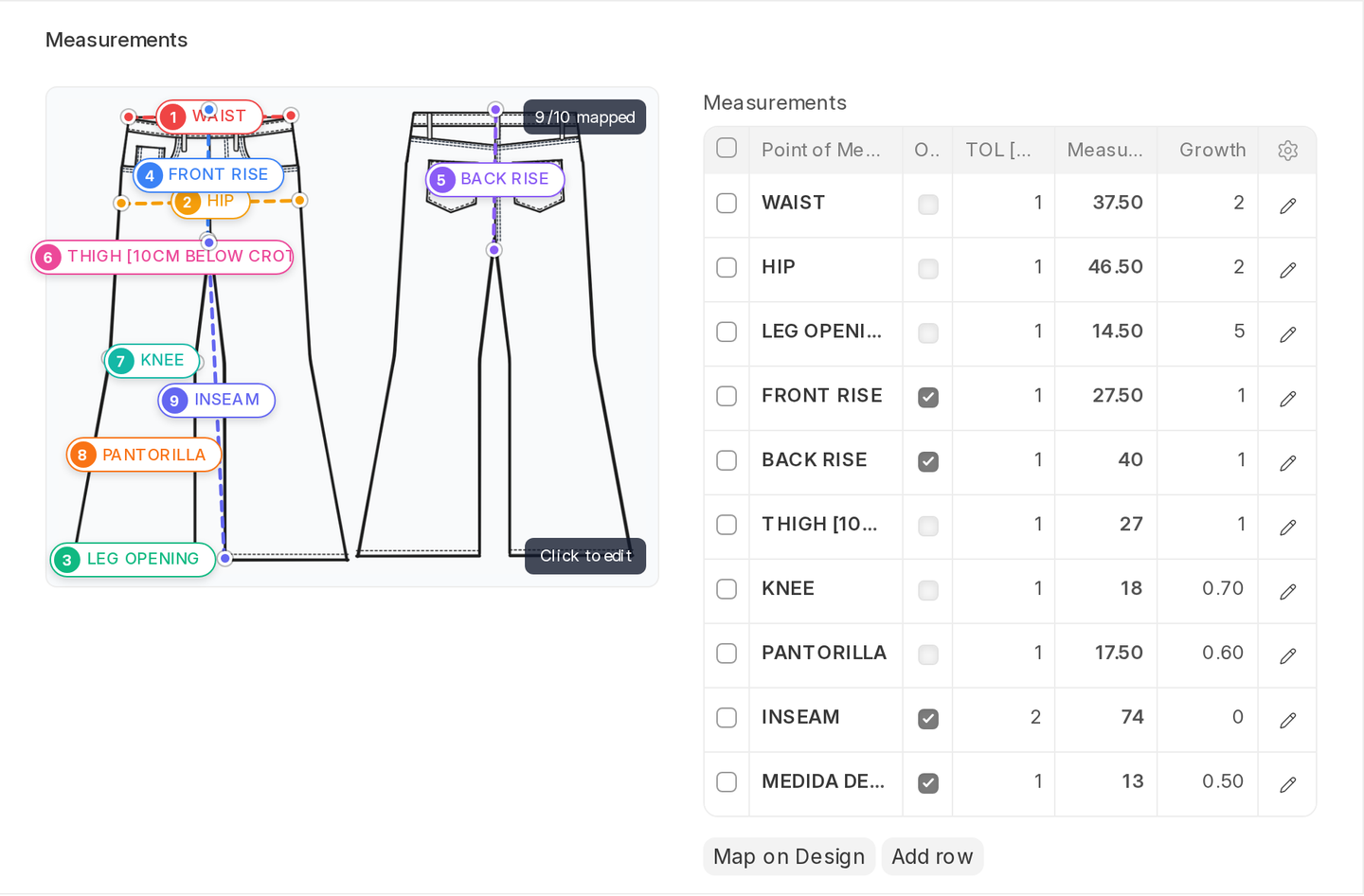
The Pattern POM table is the most important section on the Pattern record. It's a table of named measurement points — chest, sleeve length, hem opening, inseam — each one with a tolerance, a base measurement, and a growth value per size. Together, these rows tell GarmentFlow how this garment is supposed to measure across every size in the run.
What each column means
- Point of measurement — the named point, drawn from the Point of Measurement master. "Chest," "Sleeve length," "Hem opening," and so on. The master also carries an optional location image so anyone can see exactly where on the garment the measurement is taken.
- Tolerance ± — how much variance is acceptable. ±0.5 cm (0.2") on a chest, ±0.3 cm (0.1") on a collar — the kind of values your QC team agreed with the brand.
- Base measurement — what the point measures at the base size. If your base size is M, this is the chest measurement at M.
- Growth per size — how much the measurement increases (or decreases) per size grade. A chest might grow +5 cm (2") per size up; a sleeve length might grow +1.5 cm (0.6").
GarmentFlow uses these together to compute the expected measurement at every other size. Set the base value and the growth, and S, L, XL, 2XL all derive automatically.
Axis convention: X and Y on the fabric
A quick refresher because the rest of this section depends on it. In textile grading:
- X = warp. The lengthwise direction of the fabric — the direction the roll runs as it's woven. Measurements that run along X are things like inseam, front rise, sleeve length, body length — they sit along the roll.
- Y = weft. The crosswise direction — across the width of the roll, perpendicular to the warp. Measurements that run along Y are things like chest, hem, hip, waist, bust — they wrap around the body.
Most of a fabric's stretch and shrinkage happens on the Y axis as the roll opens up. That's why the Fabric master tracks Shrinkage on X and Shrinkage on Y separately — they're rarely the same number.
One source, every downstream document
The Pattern POM is the single source of truth for measurement targets in GarmentFlow. Once it's set, every downstream document reads from it:
- Tech Pack — the Logistics tab pulls the POM rows when it builds the spec sheet for production.
- Sample — the Results tab pre-fills its measurement table from the Pattern POM, with before-wash targets calculated automatically from the fabric's Shrinkage on X and Y.
- Production team — batch documents and floor instructions reference the same numbers; the cutting room, the stitching line, and the finishing team all measure against them.
- Quality team — in-line and final QC checks compare to the Pattern POM tolerances; deviations roll up into the QC reports.
This is why changing the Fabric's Shrinkage on X or Y on the Fabric master is enough to update before-wash targets across every Sample and Tech Pack that uses that fabric — the numbers aren't copied around, they're computed against the live source. Edit the Pattern once, change the fabric shrinkage once, and the whole of GarmentFlow follows.
On X — telling GarmentFlow which axis a measurement runs on
The POM master has an On X checkbox on every measurement point. It's a literal axis flag: tick it when the measurement runs along the X axis of the fabric, leave it unticked when it runs along Y.
GarmentFlow uses this to apply the right shrinkage to the right measurement. When a Sample or a Tech Pack calculates before-wash targets from the Fabric's Shrinkage on X and Shrinkage on Y, each POM row picks the matching shrinkage based on its On X flag — a lengthwise measurement uses Shrinkage on X, a crosswise measurement uses Shrinkage on Y.
GarmentFlow uses a uniform grading model: each measurement point grows by a single increment across all sizes. While some patterns introduce grading changes at specific size breaks, GarmentFlow favors a simpler and more maintainable approach. The result is a size chart that closely reflects the intended grading while avoiding the overhead of managing complex grading matrices.
You set it on the master, not on every pattern. Get it right once and it's right forever.
Tolerance is a real thing, not a guideline
The tolerance you set here is what the Sample Measurement Deviations report checks against. A sample that comes in 0.8 cm (0.3") over on a point with ±0.5 cm (0.2") tolerance is out of spec, not just close — and the report will list it. If you set tolerances loose so nothing ever fails, you've quietly given up on measurement control. Set them to what your brand actually expects.
A reasonable starting point for most garments: ±0.5 cm (0.2") on body measurements, ±0.3 cm (0.1") on collar and cuff, ±1 cm (0.4") on length measurements. Tighten where the brand is strict.
Growth tolerance — checking the grade itself
There's also a separate report — Pattern POM Growth Tolerance — that audits whether the growth values across a pattern's POM rows are internally consistent. If every other POM grows +5 cm (2") per size but one grows +2 cm (0.8"), that's worth a second look. The report surfaces those outliers so a pattern lead can sanity-check the grading.
A working example
You're setting up a Pattern for a basic crew tee, base size M.
- CHEST: base 52 cm (20.5"), growth +5 cm (2")/size, tolerance ±1 cm (0.4"), On X = ☐ (Y axis — picks up Shrinkage on Y).
- FRONT LENGTH (HPS): base 70 cm (27.5"), growth +2 cm (0.8")/size, tolerance ±1 cm (0.4"), On X = ☑ (X axis — picks up Shrinkage on X).
- SLEEVE LENGTH: base 22 cm (8.7"), growth +1.5 cm (0.6")/size, tolerance ±0.5 cm (0.2"), On X = ☑.
- HEM WIDTH: base 51 cm (20"), growth +5 cm (2")/size, tolerance ±1 cm (0.4"), On X = ☐.
- NECK: base 18 cm (7.1"), growth +0.5 cm (0.2")/size, tolerance ±0.3 cm (0.1"), On X = ☐.
That's a complete POM table for a tee. A first sample comes back at chest 52.4 cm (20.6") (within tolerance, fine) and sleeve 23 cm (9.1") (outside tolerance — flagged). You know exactly where to focus your sample-room conversation.
What to do next
When a measurement needs to change, raise a Pattern Modification Request. Don't edit the POM table directly on a pattern that's in active use.